
Blog
Quad Equalizer: How to Adjust Bass, Treble, and Sound Like a Pro

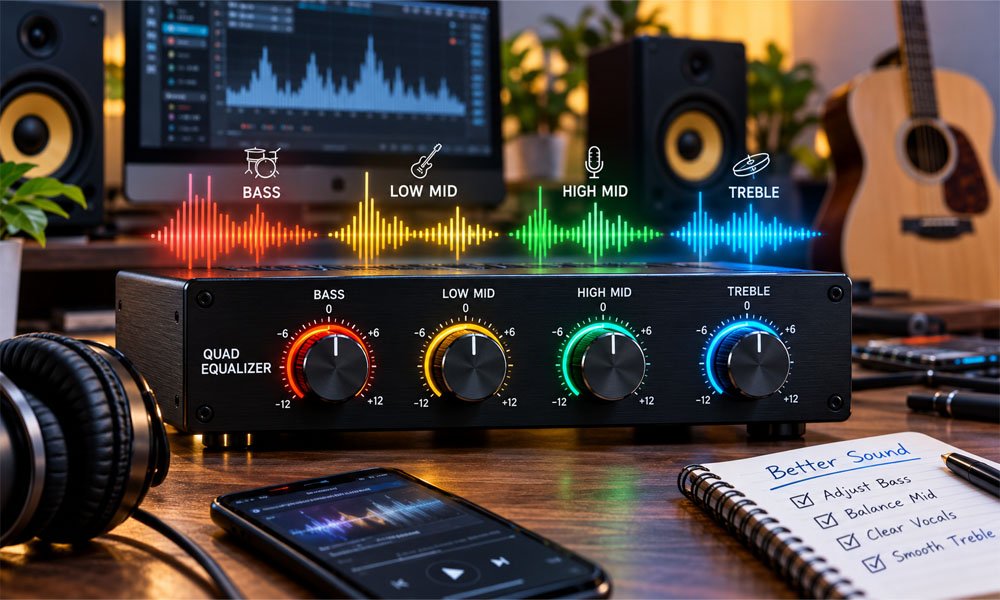
Have you ever played your favorite song and felt that the bass was too loud? Maybe the singer’s voice was hard to hear. A Quad Equalizer can help you fix these sound problems and enjoy clearer music.
A Quad Equalizer helps you change different parts of sound. You can adjust deep bass, middle sounds, and bright treble. It is useful for music, gaming, car speakers, and home audio systems.
In this guide, we will explain how a Quad Equalizer works, its main types, and its sound controls. You will also learn how to adjust bass and treble for better sound in 2026.
What Is a Quad Equalizer?
A Quad Equalizer is a sound tool that helps control different sound frequencies. The word “quad” means four. In many audio systems, it refers to four sound bands that users can adjust.
These four bands often include bass, low-mid, high-mid, and treble. Each band controls a different part of the sound. This helps users make music clearer, softer, warmer, or brighter.
However, Quad Equalizer can also mean a device with four separate audio channels. The QUAD hi-fi brand also makes special tone controls. So, the exact meaning depends on the product and its features.
How Does a Quad Equalizer Work?
A Quad Equalizer works by raising or lowering selected sound frequencies. Deep sounds have low frequencies. Sharp and bright sounds have high frequencies. The equalizer helps you control how strong these sounds are.
Sound changes are measured in decibels (dB). A positive number makes a sound range stronger. A negative number makes it weaker. When a band is set to 0 dB, it stays unchanged.
For example, imagine listening to music with very strong bass. The singer’s voice may sound hidden. Lowering the bass or low-mid band can help make the voice easier to hear.
Understanding the Four Sound Bands
A four-band Quad Equalizer divides sound into four main areas. Each area affects different parts of music. Learning about these bands makes it easier to adjust sound without making it worse.
The bass band controls deep sounds like drums and bass guitars. Low-mid controls warmth and body. High-mid helps voices sound clear. Treble controls bright sounds such as cymbals and high notes.
The table below shows common sound ranges. These ranges are only examples. Different equalizers may use different frequency points, so always check the controls on your device.
| Sound Band | Common Range | Main Use |
|---|---|---|
| Bass | 20–250 Hz | Deep sounds and drums |
| Low-Mid | 250 Hz–2 kHz | Warmth and vocal body |
| High-Mid | 2–6 kHz | Clear voices and instruments |
| Treble | 6–20 kHz | Brightness and high notes |
Different Types of Quad Equalizers
Not every Quad Equalizer works in the same way. Some models have simple sliders. Others offer more controls for changing exact frequencies. The main types include graphic, parametric, and semi-parametric equalizers.
A graphic equalizer uses fixed frequency bands. A parametric equalizer lets you choose the frequency and how wide the change will be. A semi-parametric model gives some extra control but may keep the band width fixed.
Professional devices can also have four separate channels. For example, the Mackie Quad EQ has four channels with 30 EQ bands each. The L-1 Quad VC Resonant Equalizer offers four bands for modular music equipment.
Main Features of a Quad Equalizer
A Quad Equalizer has several controls that help shape sound. Basic models may have four simple knobs. More advanced models offer frequency, gain, and Q controls for making more detailed changes.
Frequency control selects the part of sound you want to change. Gain controls how much you raise or lower it. The Q control sets how wide or narrow the change will be.
Some models also include a bypass button. This lets you hear the original sound again. Other features include saved settings, filter controls, and channel linking. These tools make sound changes easier to manage.
Best Quad Equalizer Settings for Clear Sound
The best Quad Equalizer settings depend on your speakers, headphones, and music. There is no perfect setting for everyone. A good starting point is to keep all four bands at 0 dB.
If the bass sounds too heavy, lower it by 1–3 dB. If voices sound unclear, try a small high-mid boost. If the music sounds too sharp, reduce the treble or high-mid band.
Small changes often give better results than large boosts. Always listen after each change. The goal is not to make every sound louder. It is to make music clear and balanced.
| Sound Problem | Suggested Change |
|---|---|
| Heavy bass | Lower bass by 1–3 dB |
| Muddy sound | Lower low-mid by 2–3 dB |
| Unclear vocals | Raise high-mid by 1–2 dB |
| Sharp sound | Lower high-mid by 1–3 dB |
| Dull music | Raise treble by 1–2 dB |
How to Set Up a Quad Equalizer
Setting up a Quad Equalizer is simple when you know the basic steps. First, open the EQ settings on your device or connect your equalizer to your sound system. Make sure everything is working before making changes.
Start by setting all four bands to 0 dB. Play a song you know well at a safe volume. Listen carefully to the bass, vocals, and treble. Try to find which part of the sound needs improvement.
Now, adjust one band at a time. Make small changes and listen again. Use the bypass button to compare the original sound with your new settings. If you like the result, save your settings for future use.
Quad Equalizer for Music and Gaming
A Quad Equalizer can make music more enjoyable by helping you balance different sounds. For example, if drums are too loud, lowering the bass may help. If a singer sounds unclear, changing the middle bands can improve the sound.
Music producers also use EQ to balance vocals and instruments. When several instruments play together, some sounds may cover others. Small EQ changes can help each instrument stand out without making the whole song louder.
Gamers can also use EQ for better sound balance. Lowering heavy bass may make some game sounds easier to hear. A small high-mid boost may help with voices and footsteps. However, EQ cannot create sounds missing from a game.
Quad Equalizer for Cars and Speakers
A Quad Equalizer is useful for improving sound inside cars. Car speakers often sound different from home speakers. The small space, windows, and seats can change how bass and treble reach your ears.
For example, strong bass may make music sound heavy inside a car. Lowering the bass or low-mid band can help. If vocals sound weak, a small high-mid boost may make them easier to hear.
Home speakers also need careful settings. Small speakers may not produce very deep bass. Large boosts can cause poor sound or distortion. Always test your settings with different songs. For safety, adjust car audio while parked.
Quad Equalizer for Guitar and Professional Audio
Guitar players use a Quad Equalizer to shape their sound. Many guitar and bass amps offer four tone controls. These may include bass, low-mid, high-mid, and treble. Each control changes a different part of the instrument’s sound.
For example, a guitar may sound too thick during a live show. Lowering the low-mid band can help it sound clearer. Bass players may add a little low-mid sound for warmth or high-mid sound for clearer notes.
Professional sound systems may use four-channel equalizers. Each channel can control a separate speaker feed. The Mackie Quad EQ is one example. QUAD hi-fi equipment also offers a Tilt control for gentle bass and treble changes.
Quad Equalizer vs. Other Equalizers
Equalizers come with different numbers of bands. A three-band EQ usually controls bass, middle sounds, and treble. A four-band model adds another sound area, giving users more ways to adjust music.
A five-band or ten-band EQ offers more frequency controls. This can help users make smaller changes to selected sounds. However, more bands do not always mean better results. Good settings matter more than the number of controls.
A Quad Equalizer can also have four separate channels instead of four bands. Always check the product details before buying. The table below shows how common equalizers compare.
| Equalizer Type | Bands | Common Use |
|---|---|---|
| 3-Band EQ | 3 | Basic sound control |
| 4-Band EQ | 4 | Music, cars, and guitars |
| 5-Band EQ | 5 | More sound control |
| 10-Band EQ | 10 | Detailed sound changes |
| 4-Channel EQ | Varies | Live and professional audio |
Common Quad Equalizer Mistakes and Buying Tips
One common mistake is boosting bass too much. This can make music sound muddy and hide vocals. Too much treble can also make music sharp. Small changes usually help keep the sound clear and natural.
Another mistake is copying someone else’s settings. Every speaker, headphone, and room sounds different. Always test your own system. Also, avoid using several EQ effects together because they may cause distortion.
Before buying a Quad Equalizer, check its bands, channels, and controls. Look at the input and output connections. Choose a simple model for basic listening or a parametric model for detailed sound changes. Remember, EQ cannot repair broken speakers or poor recordings.
Conclusion
A Quad Equalizer is a useful tool for changing bass, middle sounds, and treble. It can help improve music, gaming, car audio, and guitar sound. The right settings can make voices clearer and music more balanced.
The most important step is to start with all bands at 0 dB. Listen carefully and change one band at a time. Avoid large boosts because they can make sound harsh, muddy, or distorted.
In 2026, many sound systems and music apps offer EQ controls. Learning these simple settings can help you enjoy better audio. You do not need expensive equipment to begin. Good sound starts with careful listening and small changes.
(FAQs)
What is a Quad Equalizer used for?
A Quad Equalizer is used to change different parts of sound. It helps control bass, middle sounds, and treble. People use it to make music clearer, improve vocals, and reduce unwanted sounds. It is useful for cars, speakers, guitars, and music studios.
How does a Quad Equalizer improve sound quality?
A Quad Equalizer improves sound by raising or lowering selected frequencies. For example, reducing strong bass can make vocals easier to hear. Lowering sharp treble can make music softer. Small changes help create a better balance between different sounds.
What are the four bands of a Quad Equalizer?
A four-band Quad Equalizer usually has bass, low-mid, high-mid, and treble controls. Bass handles deep sounds. Low-mid adds warmth. High-mid helps voices sound clear. Treble controls bright sounds. Each band can be adjusted to change how music sounds.
What are the best Quad Equalizer settings for bass and treble?
The best settings depend on your speakers and music. Start with every band at 0 dB. If you want more bass, try a small 1–2 dB boost. If treble sounds too sharp, lower it by 1–2 dB. Avoid large changes.
Can a Quad Equalizer make vocals clearer?
Yes, a Quad Equalizer can help make vocals clearer. If bass covers the singer’s voice, lower the bass or low-mid band. You can also try a small high-mid boost. These changes may help words stand out without making the music too loud.
Is a Quad Equalizer good for car audio?
Yes, a Quad Equalizer can help improve car audio. It lets you adjust bass, vocals, and treble based on your car speakers. If bass sounds too heavy, lower it slightly. If voices sound weak, adjust the middle bands. Always test settings while parked.
What is the difference between a 4-band and a 10-band equalizer?
A 4-band equalizer controls four broad sound areas. A 10-band equalizer divides sound into ten smaller areas. This gives users more detailed control. A 4-band model is easier for beginners, while a 10-band model can help fix more specific sound problems.
Can I use a Quad Equalizer for gaming?
Yes, you can use a Quad Equalizer for gaming. Lowering heavy bass may help you hear voices and some game sounds more clearly. A small high-mid boost may improve certain sound cues. However, EQ cannot create missing sounds or replace true surround sound.
What is the difference between a graphic and parametric Quad Equalizer?
A graphic equalizer usually has fixed frequency bands that users can boost or cut. A parametric equalizer offers more control. It lets users choose the frequency, gain, and width of each change. Graphic models are simpler, while parametric models help with detailed sound adjustments.
Can incorrect Quad Equalizer settings damage speakers?
Yes, extreme EQ boosts at high volume can sometimes damage speakers. Too much bass may push small speakers beyond their limits. Strong boosts can also cause distortion. To stay safe, make small changes, keep the volume reasonable, and lower the gain when needed.
Continue reading: MathPlayzone: The Fun World of Math Games, Puzzles, and Challenges

What You Should Know Before Adding a Private Well to Your Florida Property

Batmou: What Is It and How Does It Work? A Complete Guide

Lanie Gardner Net Worth: Inside Her Income Music Career and Success

Coi Leray Net Worth: Her Salary, Earnings, and Biggest Income Sources

Sciatusc: How This Data Analysis Concept Could Change the Future

Startup Booted: What It Is, How It Works, and Why It Matters in 2026

Heavy D Sparks Net Worth: How Much Money Does the Truck Builder Make?

Cabrando: What It Really Means and Why People Are Talking About It

TechTrendery.com USA: Everything You Need to Know in 2026

Bryce Hall Net Worth: Income Career Businesses and Success Story

Arbello Barroso: Where Is Luciana Barroso’s Ex-Husband Now?

Suzanne Bukinik: Everything to Know About Brad Falchuk’s Ex-Wife

Maria Jesus Pariente: What We Know About Enzo Maresca’s Wife

Who Is Astrid Menks? All About Warren Buffett’s Wife

Who Is April Dubois? All About Wesley Snipes’ Ex-Wife

Berkin Gökbudak: What to Know About Aslı Enver’s Husband

Who Is Kate Connelly? All About Bobby Flay’s Ex-Wife

Erika Riker: Where Is Randy Jackson’s Ex-Wife Now?

Andrea Sarubbi: Who Is Luke Kirby’s Wife and What Does She Do?

Patricia Rahman: The Full Story of James Marsters’ Ex-Wife
What You Should Know Before Adding a Private Well to Your Florida Property
Batmou: What Is It and How Does It Work? A Complete Guide
Lanie Gardner Net Worth: Inside Her Income Music Career and Success
Coi Leray Net Worth: Her Salary, Earnings, and Biggest Income Sources
Sciatusc: How This Data Analysis Concept Could Change the Future
Startup Booted: What It Is, How It Works, and Why It Matters in 2026
Heavy D Sparks Net Worth: How Much Money Does the Truck Builder Make?
Cabrando: What It Really Means and Why People Are Talking About It
TechTrendery.com USA: Everything You Need to Know in 2026
Bryce Hall Net Worth: Income Career Businesses and Success Story
-

 News1 month ago
Who Is Gigi Yallouz? Meet Owain Yeoman’s Wife and Jewelry Designer
-

 News2 months ago
Rajesh Nihalani: What We Know About Archie Panjabi’s Husband
-

 News2 months ago
Stephan Farmiga: Everything to Know About Vera Farmiga’s Brother
-

 News2 months ago
Tara Nadella: What We Know About Satya Nadella’s Daughter