
Blog
Fonvira: How to Pick and Convert Colors Easily

Have you ever found a color you love but struggled to get its exact code? This is a common problem for people who make websites or digital designs. Even a small change in color can make a design look different.
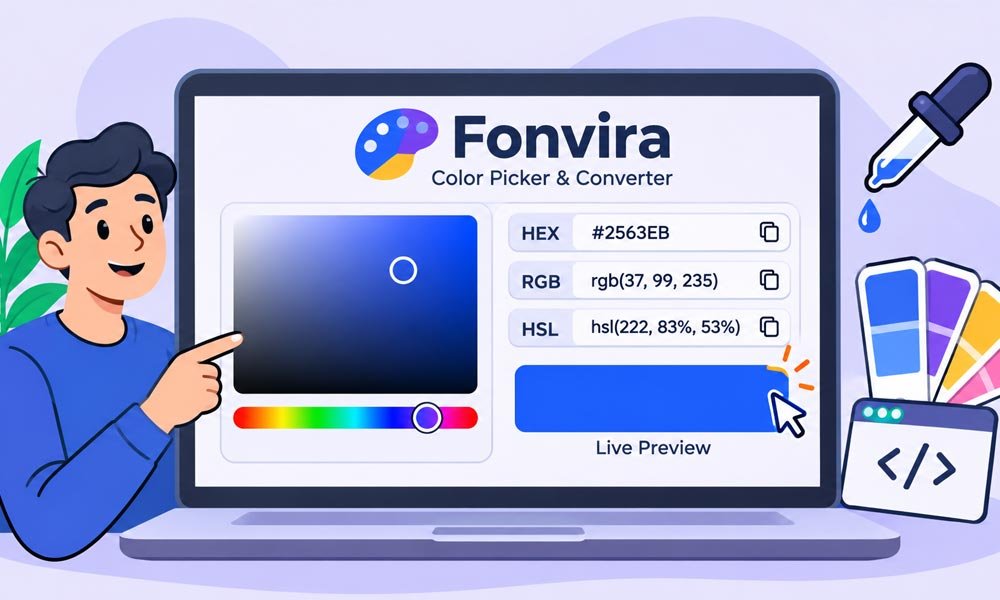
This is where Fonvira can help. It is a free online color picker and converter. It lets users pick colors and see their HEX, RGB, and HSL values in one place. You do not need to install software or create an account.
In this guide we will explore Fonvira and its main features. We will also explain how to pick colors and convert them into different formats. You will learn how designers use it and how it can make daily work easier.
What Is Fonvira?
Fonvira is a browser-based color tool made for simple color tasks. It helps users select a color and find its exact code. It also shows the same color in three common formats: HEX, RGB, and HSL.
The main idea behind Fonvira is to save time. Users do not need to work out color codes by hand or open a large design program for a small task. They can visit the website and use its color tools directly.
Another useful thing is its simple design. Beginners can use it without special skills. Web designers and developers can also use it when they need color values for a website or another digital project.
Why Is Fonvira Useful?
Color is a big part of good design. It can make a website feel warm or calm. It can also help people notice buttons and important parts of a page. But using the wrong shade can make a design look messy.
Imagine that you are making a website for your small business. You choose a blue color for the main button. Later you want to use the same blue in your logo and page headings. You need the exact color code to keep everything the same.
Fonvira makes this task easier. It shows the color values in different formats. You can copy the one you need and use it in your work. This can save time and help prevent small mistakes.
Continue reading: Michael Blakey Net Worth: Inside His Music Career and Luxury Life
What Are the Main Features of Fonvira?
Fonvira focuses on a few useful features. It does not try to be a full design program. Instead it gives users simple tools for choosing and converting colors.
Here are its main features and how they can help.
Browser-Based Color Picker
The color picker lets users choose a shade by looking at it. You do not need to know its code before selecting it. You can explore different colors until you find one that fits your design.
This can help when choosing colors for buttons or page backgrounds. You can also enter a HEX code if you already have a color in mind. This gives you a simple way to work with both new and saved colors.
HEX to RGB and HSL Conversion
One of the main uses of Fonvira is color conversion. It shows the HEX, RGB, and HSL values of a selected color. These formats use different ways to describe the same shade.
For example, you may have a HEX code from a brand guide. A developer may need its RGB value for a project. Fonvira helps find that value without doing the math by hand.
Live Color Preview
The live preview helps users see the color they have selected. This is useful because numbers alone do not always make it easy to picture a shade.
When you change the color, the preview can show the new result. You can check whether it looks right before copying the code. Still, you should test the color in your real design because screens can show shades in different ways.
One-Click Copy Options
Typing long color codes by hand can lead to mistakes. A single wrong letter or number can change the color. Fonvira makes this task easier with copy controls for the displayed values.
You can copy the format you need and paste it into your website code or design app. This is helpful when you are working with many colors and want to avoid typing each value yourself.
Free Access Without Registration
Fonvira is presented as a free tool. Users do not need to buy a plan or create an account to use its basic color features. They can open the website in a browser and get started.
This makes it easy for students and beginners to try it. It can also help people who only need a color code once in a while. There is no need to install a large program for such a small task.
Continue reading: Novafork: Everything You Need to Know About Free Movie Streaming
How Does the Fonvira Color Picker Work?
The Fonvira color picker works by linking a selected shade with its color values. When you choose a color or enter a HEX code, the tool uses that color as the main input.
It then shows the related values in other formats. You can see the HEX code along with its RGB and HSL forms. The preview also helps you check the selected shade before using it.
For example, you might select a bright blue color. Fonvira can show its HEX code as #2563EB. It can also show RGB as 37, 99, 235 and HSL as about 222°, 83%, 53%. These are different ways to describe the same blue.
How to Use Fonvira Step by Step
Using Fonvira does not need much time. You only need a browser and a color you want to select or convert. The steps are simple even if you have never used a color tool before.
Here is how you can get started.
Open the Official Fonvira Website
First visit the official website at Fonvira. You can open it in a modern browser on a computer or mobile phone.
The tool works online. You do not need to download an app or set up an account before using it. Once the page loads, look for the color picker and its input area.
Select a Color or Enter a HEX Code
You can choose a color with the picker if you want to explore different shades. Move through the available colors until you find one that suits your project.
If you already know the HEX code, enter it in the right field. For example, you can enter #2563EB to work with a blue shade. This is helpful when you are following a brand guide.
Review the Generated Values
After choosing a color, look at the values shown on the screen. You should be able to review its HEX, RGB, and HSL forms.
Check the live preview too. Make sure the shade is the one you wanted. If the code came from a design file, compare it with the source so you do not use a similar but different color by mistake.
Copy the Format You Need
The last step is to copy the color value you need. Choose HEX for many common CSS tasks. Use RGB when your code needs red, green, and blue values. HSL can help when you want to adjust a shade.
Paste the copied value into your project. Then check it on the actual page or design. This final step matters because a color can look different when placed beside text or images.
Understanding HEX, RGB, and HSL Colors
When working with Fonvira, you will see three common color formats. These are HEX, RGB, and HSL. Each one shows the same color in a different way. Knowing the basic meaning of each format can help you choose the right one for your work.
You do not need to be a coding expert to understand them. Each format has its own use. Some are better for website code, while others make it easier to change a color. Let’s look at them one by one.
HEX: A Simple Way to Name Colors
HEX is a common way to write colors on websites. It starts with a hash sign followed by six letters or numbers. For example, #FF0000 means red. The code #0000FF means blue.
Each pair in a six-digit HEX code stands for red, green, or blue. This makes it easy to save and share exact colors. Many website designers use HEX because it is short and works well in CSS.
RGB: Red, Green, and Blue
RGB stands for red, green, and blue. It uses three numbers to describe a color. Each number usually ranges from 0 to 255. These numbers control how much red, green, and blue appear in the final shade.
For example, RGB (255, 0, 0) means pure red. RGB (0, 0, 255) means pure blue. This format is useful when working with code or digital images that need direct control over color parts.
HSL: Hue, Saturation, and Lightness
HSL stands for hue, saturation, and lightness. Hue tells you where a color sits on the color wheel. Saturation controls how strong or soft the color looks. Lightness controls how light or dark it appears.
This format is helpful when you want to make small changes to a color. For example, you can keep the same blue hue but lower its lightness to make it darker. This can help when creating button colors or other shades for a website.
How to Convert Colors With Fonvira
Color conversion is one of the main reasons people use Fonvira. You may have a HEX code but need its RGB value. Or you may want an HSL value to change a shade. The tool helps you find these values without doing the math yourself.
For example, let’s use the blue color #2563EB. Its RGB value is 37, 99, 235. Its HSL value is about 222°, 83%, 53%. All three codes describe the same blue color.
The process is simple. Enter or select your color and review the values shown by the tool. Then copy the format you need. Keep in mind that HSL values may be rounded. This can cause very small changes when you convert them back into another format.
Practical Ways to Use Fonvira
Fonvira can help with many small design tasks. You can use it when making a website or changing the look of a blog. It can also help when you need to share exact color values with another person.
Here are some simple ways to use it in daily work.
Pick Colors for Website Buttons
Buttons are an important part of a website. They help visitors take action. A clear color can make a button easy to notice. You can use Fonvira to find a shade that matches the rest of your website.
For example, you may choose blue for a main button. You can copy its HEX code and add it to your CSS. You can also choose a darker shade for the hover state. This makes the button change color when someone moves their mouse over it.
Choose Background and Text Colors
A website needs colors that work well together. The background should not make the text hard to read. You can use Fonvira to find the exact codes for both colors.
For example, you might use a pale gray background with dark text. You can copy both values and use them on different pages. This helps your website look neat and keeps the colors the same.
Create Matching Brand Colors
A brand often uses the same colors on its website and other digital pages. Using different shades by mistake can make the brand look less clear. Keeping a list of color codes can help prevent this problem.
You can use Fonvira to check your main brand color and find its other formats. Save the values in a simple file. This gives your team one place to find the right colors when needed.
Make Lighter and Darker Shades
Sometimes one color is not enough for a design. You may need a lighter shade for a background and a darker one for a button. HSL can make this task easier.
You can keep the same hue and change the lightness value. This gives you a shade that still feels close to the main color. Always check the result in your design before using it.
How Fonvira Helps With Better Website Design
A good website uses colors in a clear and steady way. The same blue button should not look like three different shades on three pages. Small changes can make a website feel less neat.
Fonvira helps by giving you exact color values. You can copy the same HEX code and use it wherever you need that color. This is useful when several people work on the same website.
Developers can also save colors as CSS variables. For example they can write:
:root {
  --brand-primary: #2563EB;
}
They can then use this saved value in different parts of the website. If the brand color changes later they only need to update the main value. This helps keep the design easy to manage.
Is Fonvira Safe and Private to Use?
Privacy is worth thinking about when using any online tool. Fonvira does not ask users to create an account for its basic color features. This means you can use the tool without sharing details such as your name or email address.
According to its published privacy policy, color processing takes place in the browser. The site also describes its use of outside services such as Google Fonts and a content delivery network. These services help the website load and work.
It is still wise to read the latest privacy policy before using any online service for work that has strict privacy needs. Browser-based tools can make normal connections to outside servers even when the main color task happens on your device.
What Are the Limitations of Fonvira?
Fonvira is made for basic color tasks. It can help you pick a shade and convert it into common formats. However, it is not a full design program. It does not replace tools used to edit photos or build complete website layouts.
It also does not take care of every design need. You may need another tool to build a full color palette or test color contrast. Advanced users may also need tools that support wider color ranges such as Display P3 and OKLCH.
Another point to remember is that colors can look different on different screens. A live preview is helpful but it cannot show exactly how every person will see a color. Always test your final choices on the devices and pages that matter to your project.
Fonvira and Website Accessibility
A website should be easy for people to read. This means text must stand out from the background. If the two colors look too close it can be hard for some visitors to read the page.
The Web Content Accessibility Guidelines are often called WCAG. They give rules for checking text contrast. Under the WCAG AA level normal text should have a contrast ratio of at least 4.5:1. Large text should have at least 3:1.
Fonvira can help you find the exact color codes for your text and background. However you need a separate contrast checker to test the pair. Also avoid using color alone to share important details. Add clear words or symbols when needed.
Who Should Use Fonvira?
Fonvira can help people who work with colors in digital projects. Its simple tools make it useful for both new users and people with more design skills.
Here are some groups who may find it helpful:
-
Web designers: They can find colors for buttons and page backgrounds.
-
Developers: They can copy color values for CSS and other code.
-
Graphic designers: They can share exact colors with their teams.
-
Bloggers: They can keep website themes and images consistent.
-
Students: They can learn how HEX, RGB, and HSL work.
-
Beginners: They can pick colors without learning complex design tools.
You do not need to work as a designer to use Fonvira. Anyone who needs a color code for a digital project can find it useful.
Is Fonvira Worth Using in 2026?
Fonvira is worth trying if you need a simple way to pick and convert colors. It brings common color formats together in one place. Its browser-based setup also means you do not need to install extra software.
The tool can save time during small design tasks. You can use it to check a brand color or copy a value for a website. It can also help beginners learn how different color formats work.
However you should understand what it can and cannot do. It is a color picker and converter rather than a full design system. For advanced work you may need other tools for color palettes and accessibility checks.
Conclusion
Fonvira offers a simple way to pick colors and convert them into HEX, RGB, and HSL values. Its live preview and copy options can make everyday design tasks easier. It can also help users keep colors the same across websites and other digital work.
The best way to use it is to start with a color you already have. Check its values and copy the format you need. Then test the color in your real project. Do not forget to check text contrast before publishing.
If you often work with website colors then Fonvira may be a useful tool to keep in your daily workflow.
(FAQs)
What is Fonvira and how does it work?
Fonvira is a free online color picker and converter. It lets users select a color or enter a HEX code. It then shows the matching HEX, RGB, and HSL values with a live preview.
Is Fonvira free to use?
Yes. Fonvira offers its basic color tools for free. You do not need to pay for a plan or create an account. You can open the website in your browser and start picking colors.
How do I convert HEX to RGB using Fonvira?
Open Fonvira and enter your HEX code in the color field. The tool shows the matching RGB value. You can then copy it and use it in your website code or design project.
Can I use Fonvira on my mobile phone?
Yes. Fonvira is designed to work in mobile and desktop browsers. You can open it on your phone to select colors and copy their codes without installing an app.
Does Fonvira save the colors I select?
According to its published privacy information color processing takes place in your browser. However users should check the latest privacy policy to understand how the website handles data and outside services.
Which color format should I use for website design?
HEX is a common choice for website colors. RGB is useful when you need color values or transparency. HSL is helpful when you want to make a color lighter or darker.
Can Fonvira help me create matching color shades?
Fonvira helps you select colors and view their values. You can use HSL values to explore lighter or darker shades. However a separate color palette tool may be needed to create a full matching color scheme.
Is Fonvira useful for beginners?
Yes. Beginners can use Fonvira without knowing much about color codes. Its simple features help users understand how one color can appear in HEX, RGB, and HSL formats.
Can Fonvira create transparent colors?
Fonvira helps users find RGB values. You can add an alpha value separately in CSS to control transparency. For example rgba(37, 99, 235, 0.5) creates a blue color with 50% opacity.
Does Fonvira check website color contrast?
Color conversion and contrast testing are different tasks. Fonvira helps you find color values but should not be treated as a contrast checker without a confirmed feature. Use a separate WCAG checker to test text and background colors.
Continue reading: Gia Olimp: Everything You Need to Know About Anthony Carrigan’s Wife

Why is the Demand for Farm Equipment Loans Rising in Modern Agriculture

Beyond the Surgery: Understanding the Full Cost of Scoliosis Surgery in India

How to Maintain Your PC for Better Everyday Performance and Gaming

The Growing Role of SEBI CSCRF in Financial Data Protection

How Employer Of Record Services Help Startups Expand Into New Markets With Lower Operational Risk

What Most Homeowners Miss When Planning a Roof Replacement in Sacramento

Smarter Lawn Feeding and Seeding: How You Get Better Results With the Right Spreader

A Home That Lasts: Smarter Choices for the Next Ten Years

Caroline Fentress: Everything About Chris O’Donnell’s Wife

A Season-by-Season Plumbing Guide for New York Homes

Buying Property Through Your Super? Run an SMSF Loan Calculator Before You Call a Broker

How to Make Kofta Kebabs at Home Without Overthinking It

Eractoll: What Is It and Why Did Enterprise Charge You?

Press Release Distribution for Startups: A Practical Guide to Your First Announcement

NF Net Worth: How the Rapper Turned Pain Into Millions

Michele Morrone Net Worth: His Salary, Earnings, and Rich Life

Naomi Burton-Crews: The Heartwarming Story of Terry Crews’ Eldest Child

Innovations in Floristry: BOPP Matte Film as the Go-To Material for Modern Flower Packaging

How Interactive Step-by-Step Guides Make Tech Easier to Learn

Inside the Obsession With Chrome Hearts and CDG
Why is the Demand for Farm Equipment Loans Rising in Modern Agriculture
Beyond the Surgery: Understanding the Full Cost of Scoliosis Surgery in India
How to Maintain Your PC for Better Everyday Performance and Gaming
The Growing Role of SEBI CSCRF in Financial Data Protection
How Employer Of Record Services Help Startups Expand Into New Markets With Lower Operational Risk
What Most Homeowners Miss When Planning a Roof Replacement in Sacramento
Smarter Lawn Feeding and Seeding: How You Get Better Results With the Right Spreader
A Home That Lasts: Smarter Choices for the Next Ten Years
Caroline Fentress: Everything About Chris O’Donnell’s Wife
A Season-by-Season Plumbing Guide for New York Homes
-

 News2 months ago
Who Is Gigi Yallouz? Meet Owain Yeoman’s Wife and Jewelry Designer
-

 News2 months ago
Who Is Tove Torvalds? All About Linus Torvalds’ Wife
-

 News2 months ago
Rajesh Nihalani: What We Know About Archie Panjabi’s Husband
-

 News3 months ago
Stephan Farmiga: Everything to Know About Vera Farmiga’s Brother